 PrintCAD
The Fastest Native Mac CAD for 3D Printing
Ditch bloated cloud suites and fragile browser tools. PrintCAD launches in 0.1 seconds, guarantees watertight STLs, and exports directly into Bambu Studio & OrcaSlicer in a single click.
Free 14-day full feature trial • 3.5 MB lightweight installer • No credit card required • Offline native app
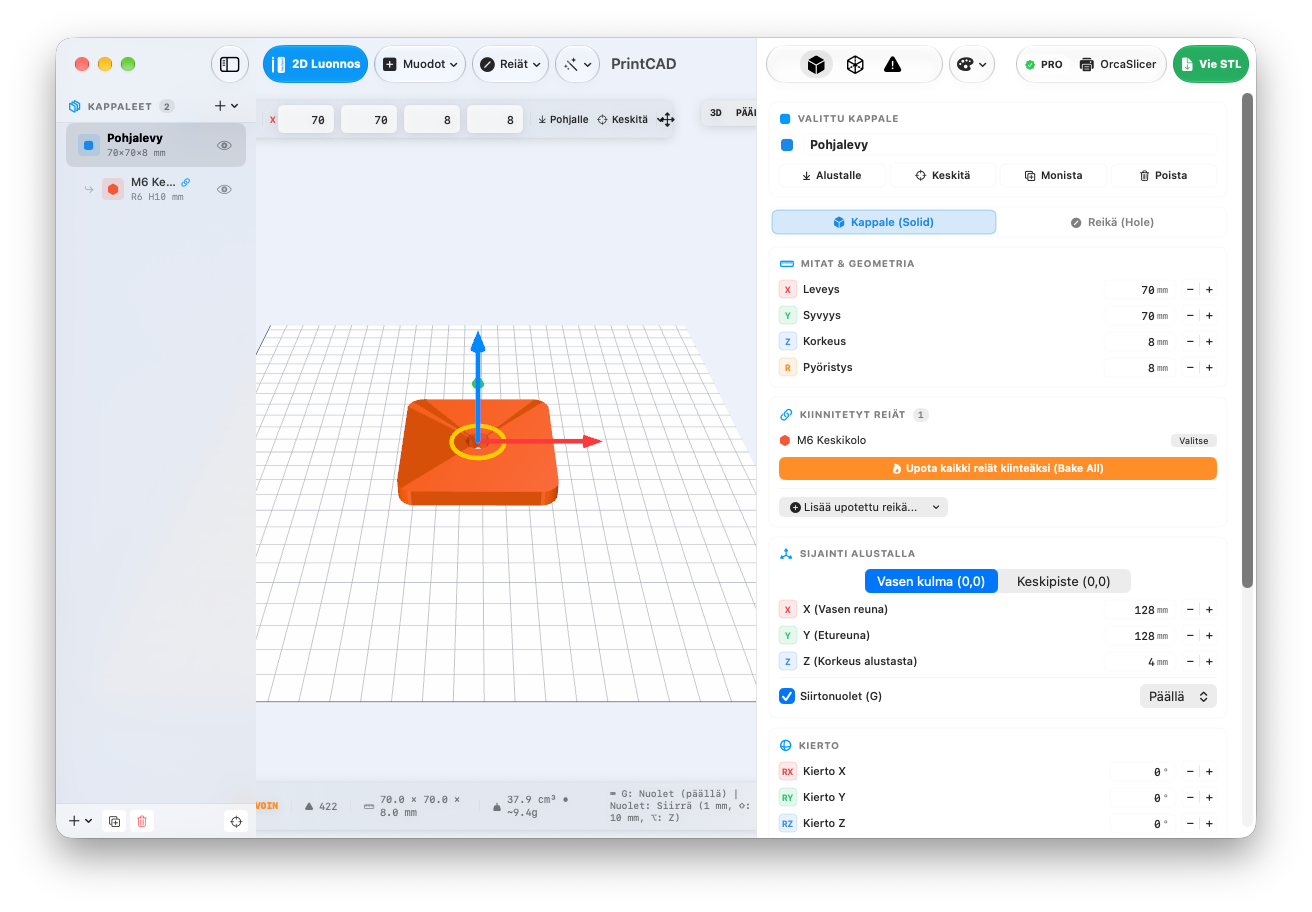
Built for Functional 3D Printing
Everything you need for mechanical brackets, enclosures, adapters, and prototypes without the 90% bloat of industrial CAD.
Standard DIN Fasteners
Instant presets for DIN 7991 countersunk screws, DIN 912 socket head cap screws, and DIN 934 hex nut pockets (M3 to M8) with real-world print tolerances.
2D Sketcher & Extrude
Draw custom 2D polygon profiles directly on the grid and extrude them into 3D solids in real time with live vertex snaps.
1-Click Slicer Bridge
Hit "OrcaSlicer" or "Bambu Studio" to automatically generate a binary STL and open it right on your virtual print bed.
Live Mesh Overhang Analyzer
Inspect overhang angles greater than 45° with visual heatmaps before sending to your printer so you never fail a print from missing supports.
Electronics Enclosure Generator
Generate a 2-part snapping project box with screw standoffs and lid lip in one click. Customize wall thickness and internal dimensions instantly.
Arrow Nudge & Direct Numeric CAD
Move objects along X/Y/Z using arrow keys (1 mm, 10 mm with Shift) or enter precise millimeter dimensions directly from your keyboard.
Why Makers Switch to PrintCAD
See how PrintCAD compares to heavyweight cloud suites and toy browser editors.
| Feature | PrintCAD | Fusion 360 | Tinkercad |
|---|---|---|---|
| Startup Time | 0.1 seconds | 15–30 seconds | Depends on browser/server |
| Pricing Model | 29 € Lifetime (One-time) | 85 € / month ($680/yr) | Free (Toy-limited) |
| Cloud Dependency | 100% Offline & Private | Mandatory cloud sync | Mandatory web connection |
| DIN Screws & Nut Pockets | Built-in 1-Click presets | Complex menu wizards | Manual hollow cylinders |
| Direct Slicer Launch | 1-Click to Bambu / Orca | Export file -> Open slicer | Download -> Locate -> Import |
| App Size | 3.5 MB installer | ~2.5 GB installation | Browser cache |
| Native Mac Technology | Swift + SceneKit / Metal | Ported C++ Qt wrapper | WebGL in browser |
Simple, Fair Indie Pricing
No recurring subscriptions. Pay once, use forever on all your Macs.
PrintCAD Pro
- ✓ Unlimited commercial & personal 3D CAD modeling
- ✓ 1-click export to Bambu Studio, OrcaSlicer & PrusaSlicer
- ✓ All DIN fastener presets (M3–M8) & custom holes
- ✓ 2D Sketcher with polygon extrusion
- ✓ Built-in project enclosure generator
- ✓ 1 full year of software updates included
- ✓ Valid for all your personal Apple Silicon & Intel Macs
🔒 Direct payment to niko.pietinen@gmail.com. Lifetime Pro key delivered immediately to your PayPal email.
Frequently Asked Questions
Which macOS versions are supported?
PrintCAD is built natively for macOS 14 Sonoma and macOS 15 Sequoia. It runs natively on all Apple Silicon chips (M1, M2, M3, M4) as well as Intel Macs.
How does payment and license delivery work?
Payment is processed securely via PayPal (accepts all debit/credit cards & PayPal). Your license key (e.g. PCAD-XXXX-XXXX-XXXX) is emailed directly to your PayPal address. For instant help or questions, contact Niko at niko.pietinen@gmail.com.
Can I install PrintCAD on multiple Macs?
Yes. A single personal license allows you to activate PrintCAD across all your personal Macs (e.g. desktop Mac Studio and MacBook Pro).
Will it work with my 3D printer?
Yes! PrintCAD exports clean, standard Binary STL files compatible with every 3D slicer on the market (OrcaSlicer, Bambu Studio, PrusaSlicer, Cura, Lychee, Simplify3D).